
What if your AI could automatically compile the most important information for you every morning — without you lifting a finger? That’s exactly what Anthropic now enables with the new Recurring Tasks in Claude Cowork. Instead of manually launching AI tasks every day, you describe once what Claude should do for you — and the AI executes it automatically on your schedule. Daily, weekly, or on weekdays only. What initially sounds like a minor feature update could fundamentally change how we organize knowledge work.
What Are Claude Recurring Tasks?
Recurring Tasks are a new feature within Claude Cowork, the agentic work environment in the Claude Desktop app. Cowork brings the powerful agent architecture from Claude Code to the desktop, enabling users to delegate complex, multi-step tasks to Claude — without writing a single line of code.
With Recurring Tasks, Anthropic takes a decisive step further: you create a task description (a prompt) once, choose a frequency — and Claude handles the rest. Each scheduled run operates as its own independent Cowork session. You can review the results whenever you’re ready, just like any other task.
The feature is available for all paid plans: Pro ($20/month), Max ($100–$200/month), Team, and Enterprise.
What Can Recurring Tasks Actually Do?
Scheduled tasks have access to the same capabilities as regular Cowork tasks — including connected tools, skills, and installed plugins. Claude can access local files, perform web research, read Slack messages, process Google Drive documents, and much more.
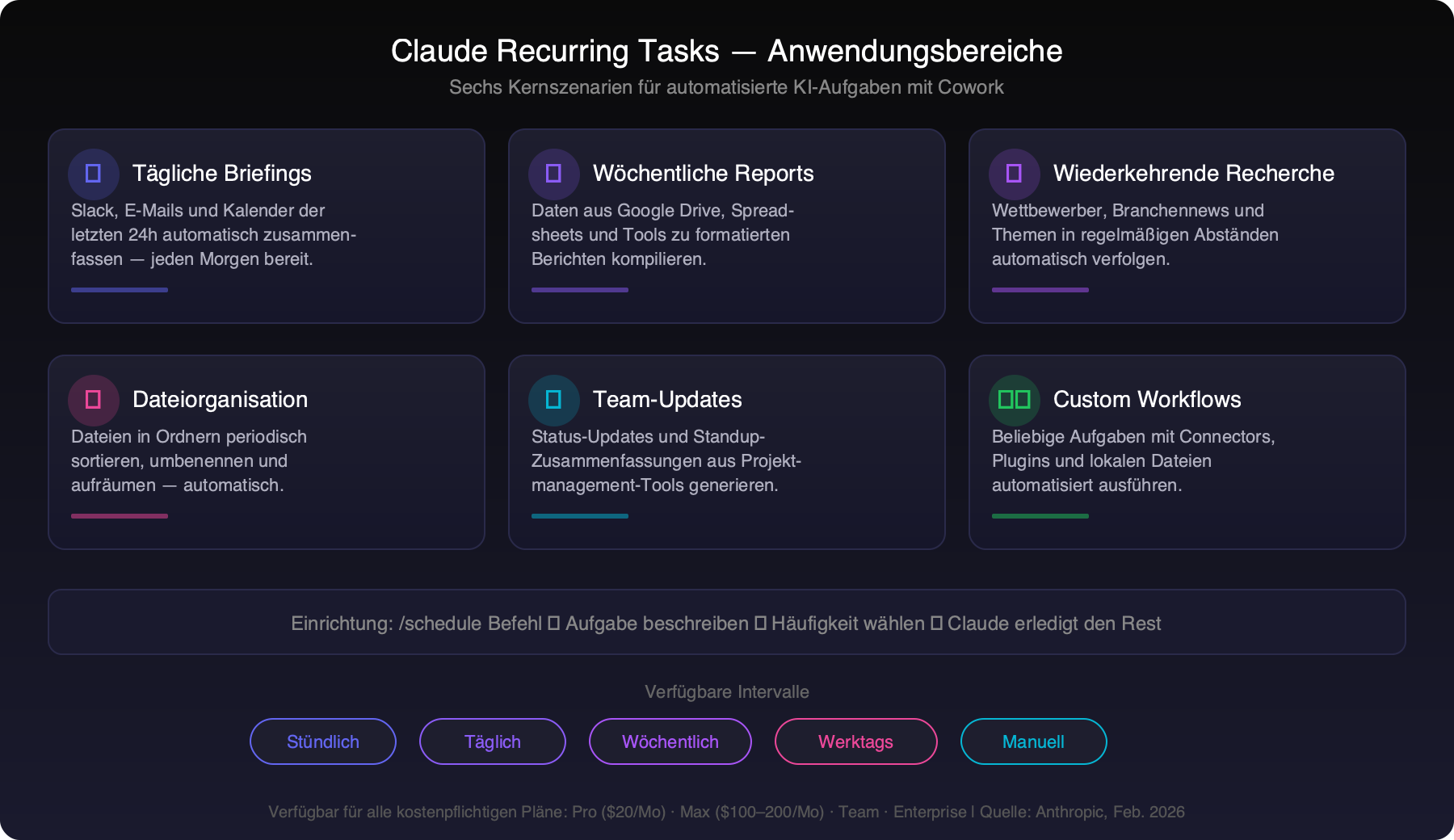
Anthropic highlights five core scenarios in their official documentation:
- Daily briefings: Summarize Slack messages, emails, or calendar events from the past 24 hours.
- Weekly reports: Compile data from Google Drive, spreadsheets, or connected tools into formatted summaries.
- Recurring research: Track topics, competitors, or industry news on a regular cadence.
- File organization: Periodically sort, clean up, or process files in a designated folder.
- Team updates: Generate status updates or standup summaries from project management tools.
How to Set Up Recurring Tasks — Step by Step
There are two ways to create a recurring task in Claude Cowork:
Method 1: The /schedule Command
The quickest method, directly from a running Cowork session:
- Open Cowork and click “+ New task” or use an existing task.
- Type
/schedulein the input field. - This launches a skill for creating a scheduled task.
- Describe the desired task in detail and click “Let’s go”.
- Claude may ask clarifying questions — with multiple-choice options.
- Once Claude has all the information, it will display the task name, schedule, and task description.
- Confirm with “Schedule”.
- The task now appears on the “Scheduled tasks” page.
Method 2: Via the Scheduled Tasks Page
The more structured approach through the management interface:
- Click “Scheduled” in the left sidebar.
- Click “+ New task” in the upper right.
- Fill in the form:
- Task name: A descriptive name
- Description: Task description
- Prompt: Detailed instructions for what Claude should do
- Frequency: Hourly, daily, weekly, weekdays, or manually
- Model: (Optional) Which Claude model to use
- Working folder: (Optional) Which folder Claude should work in
- Click “Save”.
Managing Tasks
Through the “Scheduled” page in the sidebar, you can view and manage all scheduled tasks:
- Review past and upcoming runs
- Edit instructions or schedule after creation
- Pause and resume tasks
- Delete tasks
- Trigger tasks manually on demand
Important to Know: Requirements and Limitations
Before setting up Recurring Tasks, you should know some technical details:
- Desktop app required: Recurring Tasks only work in the Claude Desktop app for macOS and Windows. Web and mobile versions are not supported.
- Computer must be active: Scheduled tasks only run when your computer is awake and the Claude Desktop app is open. If the computer is in sleep mode or the app is closed, the task is skipped — and automatically caught up once the app is running again.
- Each run = separate session: Each scheduled execution runs as an independent Cowork session. There is no memory between individual runs.
- Higher usage consumption: Cowork tasks consume more of your usage quota than regular chats, as multi-step tasks are more compute-intensive.
- Team/Enterprise: Administrators can control Cowork access centrally via an admin toggle.
Practical Examples: How Different Industries Use Recurring Tasks
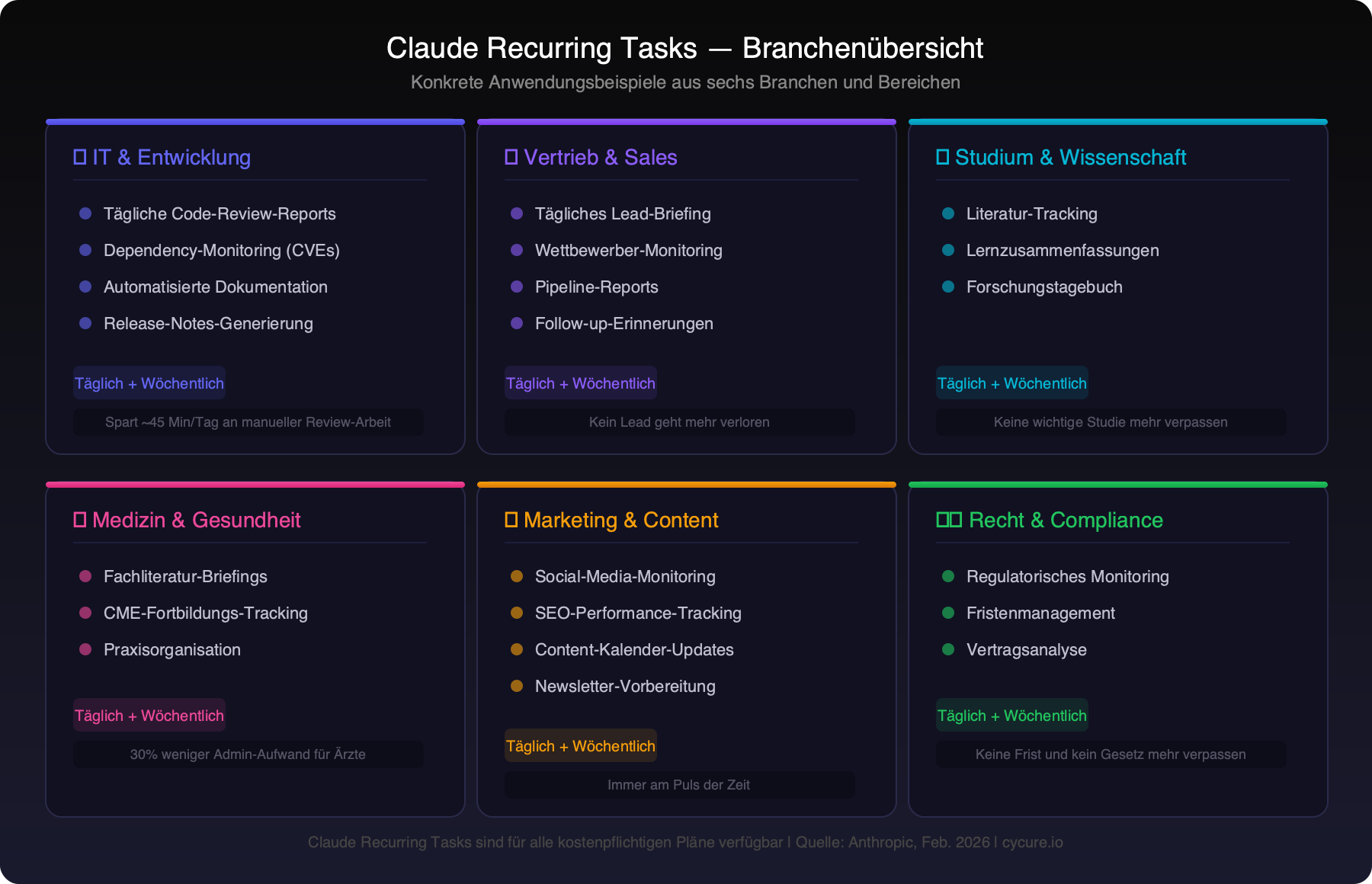
The true strength of Recurring Tasks shows not in theory, but in concrete use cases. We’ve identified six industries and areas where this feature can deliver real value:
1. Software Development & IT
Developers can use Recurring Tasks to significantly optimize their workflow:
- Daily code review report: Claude scans the Git repository, summarizes the most important commits from the past 24 hours, and identifies potential code issues.
- Dependency monitoring: Weekly checks of all dependencies for known security vulnerabilities (CVEs) and available updates.
- Automated documentation: Claude updates project documentation based on code changes — a pain point that gets neglected in many teams.
- Release notes generation: Before each sprint end, Claude compiles all completed tickets and changes into release notes.
2. Sales & Business Development
In sales, every minute counts. Recurring Tasks can eliminate routine work:
- Daily lead briefing: Claude searches CRM data and emails every morning, summarizes new leads, and prioritizes by closing probability.
- Competitor monitoring: Weekly web research on competitor activities, pricing changes, and new products — automatically compiled as a briefing.
- Pipeline reports: Daily or weekly summary of the sales pipeline with changes compared to the previous day or week.
- Follow-up reminders: Claude identifies deals with no contact for more than X days and creates prioritized follow-up lists.
3. Education & Academia
For students and researchers, Recurring Tasks open entirely new possibilities:
- Literature tracking: Claude weekly searches relevant paper databases for new publications on a defined research topic.
- Study summaries: Daily summary of personal notes and highlights from the study week — ideal for exam preparation.
- Research journal: Claude weekly compiles all collected sources, notes, and findings into a structured research journal.
4. Healthcare & Medicine
In the medical field, Recurring Tasks can reduce administrative burden — which according to studies accounts for over 30% of physicians’ working time:
- Daily medical literature briefings: Summary of new studies and guideline changes in a specific specialty.
- Continuing education tracking: Weekly overview of completed and upcoming CME (Continuing Medical Education) credits.
- Practice organization: Daily preparation of appointment lists, patient information, and pending tasks.
Important note: According to Anthropic, Cowork is currently not suitable for regulated workloads. Sensitive patient data should not be processed through Cowork. This scenario refers to general information preparation, not patient records.
5. Marketing & Content Creation
Content teams can significantly accelerate recurring tasks:
- Social media monitoring: Daily summary of mentions, sentiment analysis, and trending topics in your industry.
- SEO performance tracking: Weekly reports on keyword rankings, traffic trends, and new ranking opportunities.
- Content calendar updates: Claude cross-references the content plan with current industry trends and suggests time-sensitive topics.
- Newsletter preparation: Weekly compilation of relevant content, statistics, and topic ideas for the next newsletter.
6. Legal & Compliance
For law firms and compliance departments, Recurring Tasks offer particular potential:
- Regulatory monitoring: Daily monitoring of new laws, regulations, and court decisions in relevant legal areas.
- Deadline management: Weekly summary of upcoming deadlines from project management tools.
- Contract analysis: Periodic review of contract folders for expiring contracts or notice periods.
Cowork in Context: How the AI World Has Changed in the Past Two Years
To properly assess the significance of Recurring Tasks, it’s worth looking at the rapid developments of the past two years:
In early 2024, ChatGPT had just turned one year old, Claude 2 was Anthropic’s state of the art, and “agentic AI” was a conference buzzword — far from practical reality. AI assistants could write texts and answer questions, but independently execute tasks? Only visionaries talked about that.
Throughout 2024 and 2025, development accelerated dramatically:
- OpenAI introduced GPT-4o and o1 — models that for the first time featured multi-step reasoning.
- Anthropic released Claude 3 (Opus, Sonnet, Haiku), followed by Claude 3.5, Claude 4, and finally Sonnet 4.6 in February 2026.
- Google launched Gemini as the successor to Bard — with deep integration into Workspace.
- Claude Code became the preferred tool for developers doing AI-assisted programming.
- Anthropic’s valuation rose to $380 billion (February 2026), with run-rate revenue at $14 billion — a sign of massive demand.
The shift from “AI as chatbot” to “AI as agent” happened faster than most experts had predicted. Cowork and Recurring Tasks are the logical next step: AI that doesn’t just react, but acts proactively and independently.
What This Means for the Future of Knowledge Work
Recurring Tasks may appear like a nice productivity feature. But at their core, they represent a fundamental shift: AI evolves from a reactive tool to a proactive assistant.
Previously, you had to actively ask an AI to get a response. With Recurring Tasks, this paradigm flips: Claude works independently, delivers results, and waits until you have time to review them. This resembles less a chatbot and more a digital colleague who autonomously handles routine tasks.
The implications are far-reaching:
- Democratization of expertise: A solopreneur can receive an executive briefing each morning that previously required a team of three analysts to produce.
- Time savings on routine work: Tasks that consume 30–60 minutes daily — email summaries, report creation, file organization — run in the background.
- Better decision-making foundations: Regular, automated research ensures decision-makers always have up-to-date information.
- New roles instead of job loss: Rather than eliminating manual tasks, Recurring Tasks shift the focus to evaluation, strategy, and creativity — areas where humans continue to outperform AI.
Tips for Getting Started: How to Get the Most Out of It
If you’d like to try Recurring Tasks, we recommend the following approach:
- Start small: Begin with a single daily task — for example, a summary of your emails or Slack messages. Observe the quality of results before adding more tasks.
- Write precise prompts: The more specific your instructions, the better the results. Explicitly describe the desired output format, sources, and priorities.
- Set up connectors: Connect Slack, Google Drive, Notion, or other tools through Cowork connectors to give Claude maximum context.
- Monitor usage limits: Cowork consumes more capacity than regular chats. If you’re on a Pro plan ($20/month), consider whether upgrading to Max ($100/month) makes sense for intensive Recurring Tasks usage.
- Review results regularly: AI isn’t perfect. Check results especially carefully during the first weeks and adjust your prompts based on the outcomes.
Conclusion: The Beginning of a New Era of AI Automation
Claude Recurring Tasks are more than a feature update — they mark the transition from AI as a reactive tool to AI as a proactive partner. What begins today with daily briefings and weekly reports will evolve over the coming months and years into increasingly complex, autonomous workflows.
And here’s the good news: This technology isn’t a replacement for human intelligence — it’s an amplifier. It frees us from repetitive routine work and gives us the freedom to focus on what humans do best: think creatively, make strategic decisions, and build meaningful relationships.
Those who learn today to effectively use and delegate to AI agents like Claude gain a decisive advantage — professionally and personally. The question is no longer whether AI will change your workday. It’s only: How quickly will you adapt?
Want to Implement AI Automation in Your Business?
As an IT service provider for small and medium businesses in Cologne and the surrounding area, we support you in introducing and integrating AI solutions — from strategy through implementation to ongoing operations. Whether Claude, GPT, or custom automation solutions: we’ll find the right fit for your business.
Sources
- Anthropic — Schedule recurring tasks in Cowork (Support documentation, updated Feb 26, 2026)
- Anthropic — Get started with Cowork (Support documentation, updated Feb 26, 2026)
- Anthropic — Claude Cowork Product Page (2026)
- Anthropic Newsroom — Latest Announcements (2026)